Quad Cortex Mini + MC4 PRO: The Perfect MIDI Controlled Compact Rig
- Ben
- 12 hours ago
- 3 min read
The Neural DSP Quad Cortex Mini is a dream come true for guitarists who want the full power of the Quad Cortex in a significantly smaller footprint. But let’s be honest. When you shrink a device from 11 footswitches down to just 4, there are bound to be some trade-offs.
In scenarios where live control, navigation, and workflow matter, less switches naturally means less immediate access to key functions. Fortunately, there’s a solution.

Why MC4 PRO Is the Perfect Quad Cortex Mini MIDI Controller
The newly released Morningstar MC4 PRO pairs exceptionally well with the Quad Cortex Mini, restoring the control and flexibility that many players miss.
Adding a MIDI foot controller to the Quad Cortex Mini should not mean you use only the MIDI controller to control it. The Quad Cortex Mini still has 4 footswitches, which should be used in tandem with the MC4 PRO footswitches.
“The goal isn’t to replace the Quad Cortex Mini’s switches. It’s to make both devices work together in perfect harmony.”

The Numbers Don’t Lie
A Quad Cortex Mini + MC4 PRO setup offers several advantages over a full-sized Quad Cortex:
33% smaller footprint than a full-sized Quad Cortex
Fits comfortably on a nano-sized pedalboard
Costs approximately $100 less
Provides expanded MIDI control for pedals, software, and DAWs
Offers more flexible rig configurations across numerous different setups

For players building compact fly rigs or hybrid pedalboards, this is a compelling combination.
Solving One of the Quad Cortex Mini’s Biggest Frustrations
One of the more challenging aspects of using the Quad Cortex Mini live is its Page 1 / Page 2 footswitch system.
Each switch performs different functions depending on which page you’re currently viewing. The problem?
It’s not always obvious which QC Mini page (I or II) you’re on during a performance. And it takes an extra step to toggle page.
With the MC4 PRO, the additional four footswitches can effectively become your dedicated Page 2 switches, giving you instant access to all eight footswitch functions immediately.

Benefits of This Setup
No more switching between pages mid-song
Faster access to presets, scenes and effects
Improved visibility on stage
More confidence during live performances
Faster Preset and Bank Navigation

Navigating to a preset directly on the Quad Cortex Mini requires several steps:
Enter Preset Mode
Hold down B+D to enter Banking Mode
Press A+C or B+D to bank up/down
Tap on your desired preset to preview it
Tap on it again to engage preset
With the MC4 PRO?
One switch = Bank Up, One switch = Bank Down
Tap on on a preset switch on the QC Mini to engage desired preset
That’s it.
Dedicated Mode Switching

Another major improvement is direct access to Quad Cortex Mini modes. Instead of cycling through modes on the unit itself, the MC4 PRO allows you to jump instantly between:
Preset Mode
Scene Mode
Stomp Mode
The MC4 PRO’s display also clearly indicates the active mode, reducing the risk of accidental preset changes during a performance.
Instant Access to All 8 Scenes

Long-press actions on the MC4 PRO can automatically open dedicated Scene banks, giving you access to all eight Quad Cortex Mini scenes. This workflow allows:
Page 1 scenes on the Quad Cortex Mini
Page 2 scenes on the MC4 PRO
Visual indication of the currently selected scene
Quick access to Tap Tempo and Gig View
The result is a much more streamlined live performance experience.
Complete Control Over Effects and Footswitches
In Stomp Mode, the MC4 PRO can provide direct access to the Quad Cortex Mini’s Page 2 footswitch functions. This means:
More effects available at once
Less menu diving
Simultaneous access to both pages of controls
If needed, you can even configure additional pages on the MC4 PRO to mirror Page 1 functions for complete visibility.
Quick Access to Favorite Presets
Using standard MIDI Program Change messages, you can create a dedicated Favorites Bank on the MC4 PRO.
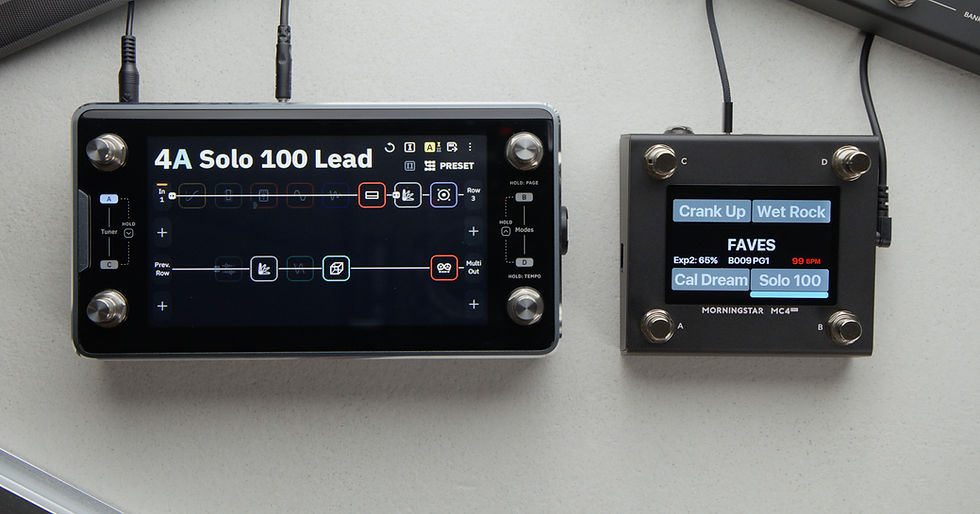
With a single press, you can:
Recall favorite presets instantly
See which preset is active via color indicators
Download the Ready-Made MC4 PRO Banks
To make setup even easier, all of the MC4 PRO banks shown in the accompanying video are available for download.
Whether you want to duplicate the exact workflow or simply use it as a starting point, you can load these banks into any unused MC4 PRO bank and start controlling your Quad Cortex Mini immediately.
Final Thoughts
The Quad Cortex Mini is an incredibly powerful processor, but its compact design naturally limits direct access to functions during live use.
Pairing it with the Morningstar MC4 PRO solves many of those challenges while preserving the portability that makes the Mini so appealing in the first place.
For players who want a compact rig without sacrificing workflow, visibility, or performance control, the Quad Cortex Mini + MC4 PRO combination may be the best of both worlds.